Your Entire Store Under Control.
From the first barcode scan... to daily closing.
ZAAD POS integrates sales, inventory, cashier shifts, customer debt, suppliers, stock counts, and financial movements into one unified desktop computer system engineered for supermarkets, hypermarkets, and retail stores.
Fast during peak hours. Clear accounting. Your store data stays with you.
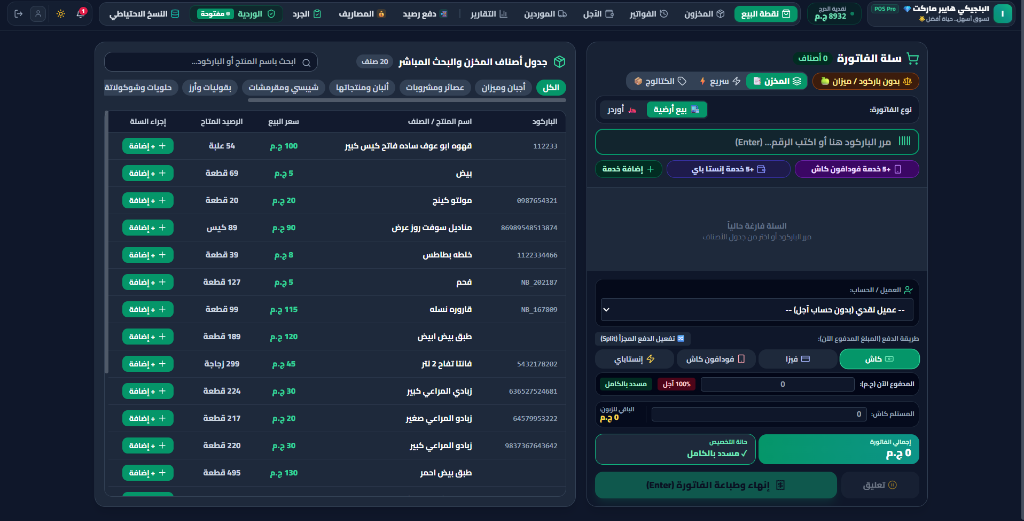
Not Just Another POS Software.
ZAAD Connects Your Entire Store Operation.
Every sale, purchase, collection, or expense directly impacts inventory, cash flow, and audit records.
Know Where Your Money Is
Track sales, collections, expenses, suppliers, and payment channels in one clear financial view.
Inventory Moves with Your Operations
Sales, purchases, returns, or counts — item stock remains directly tied to the transaction.
Every Shift Has an Assigned Operator
From opening float to actual cash in drawer, expected balances, and shortage or surplus.
Your Store Data Stays Yours
Core operations and sensitive business records are stored 100% locally on your store computer.
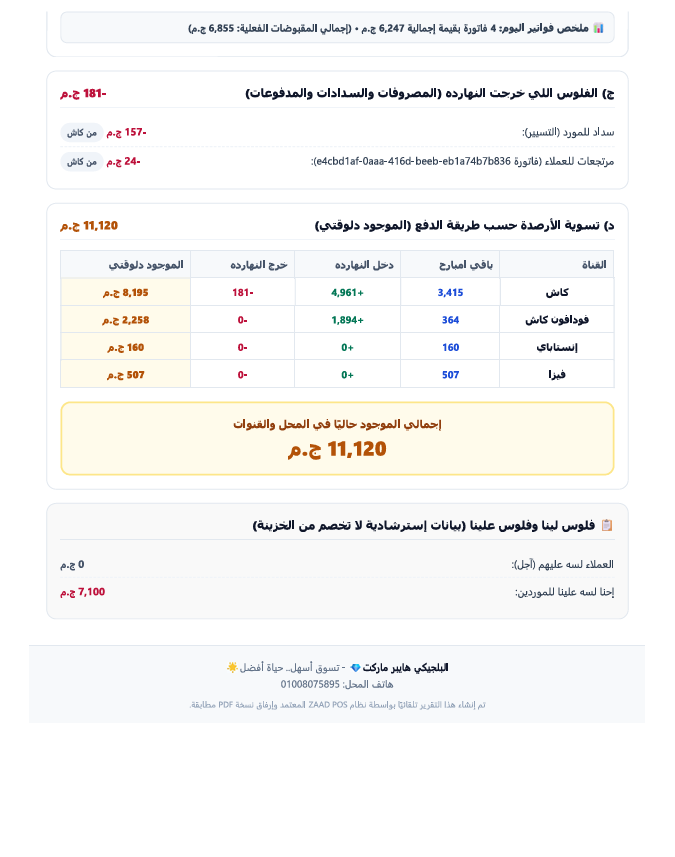
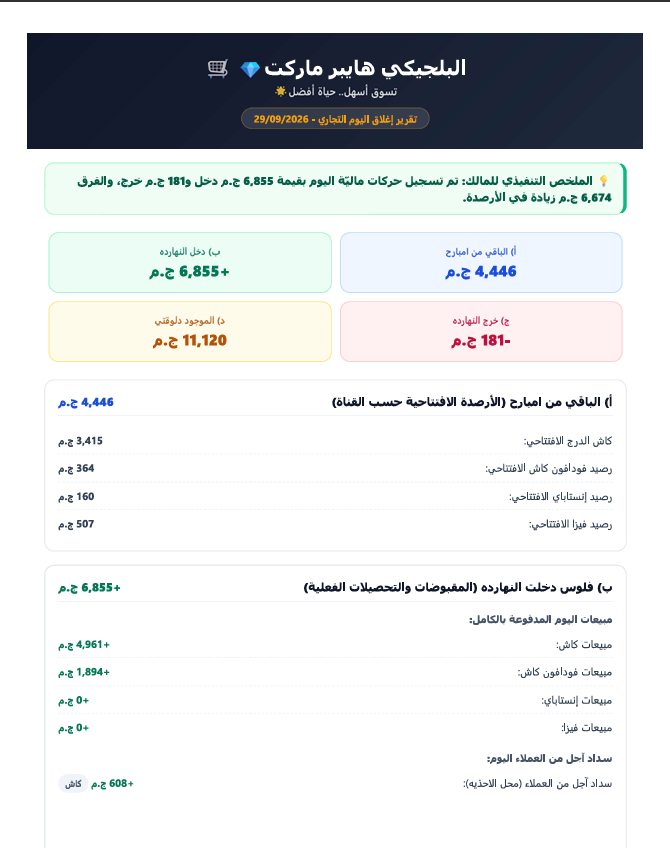
At the End of the Day... Know Exactly What Happened.
Instead of piecing together numbers from multiple screens, ZAAD summarizes the commercial business day into one clear Daily Z: previous balance, today's money in, today's money out, and current balance — with transaction details and payment channels.
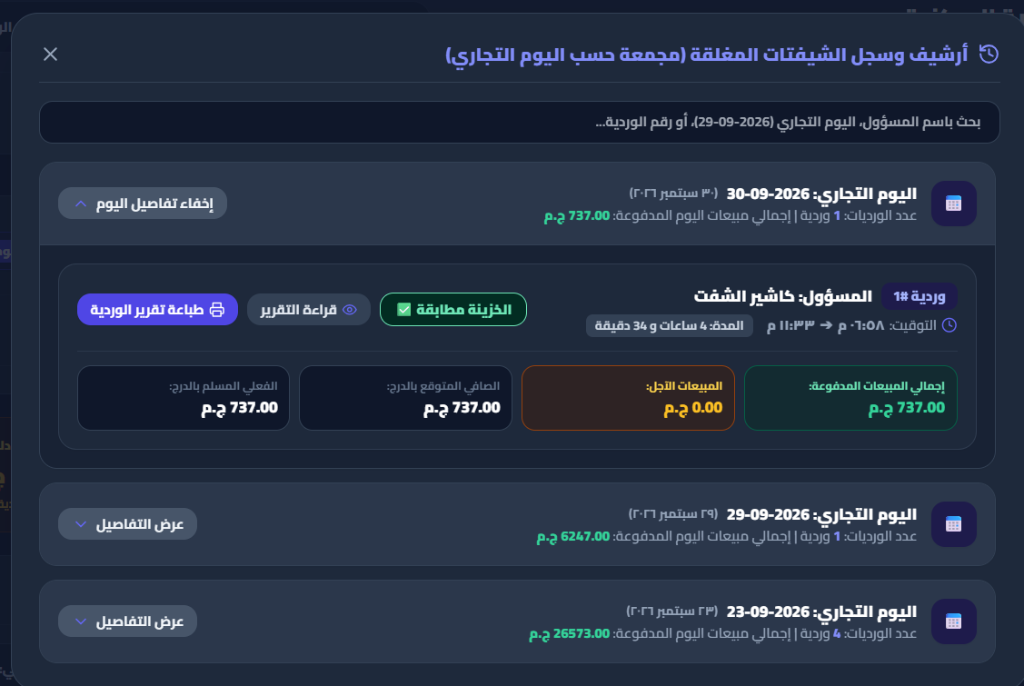
Every Shift Reconciled to the Last Pound.
From float handover... to cash drawer reconciliation.
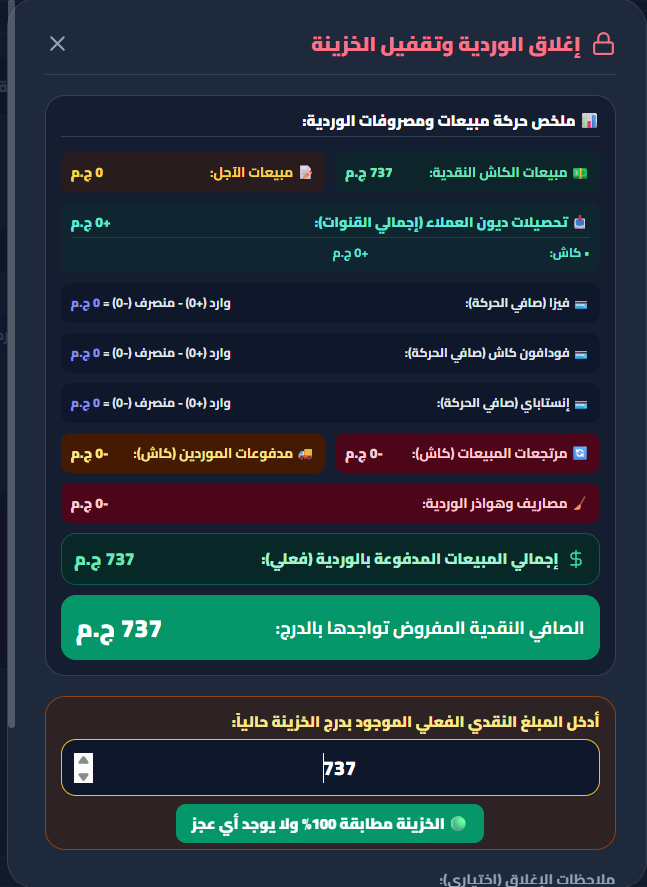
At shift closing, ZAAD aggregates cashier sales, calculates expected drawer cash, compares it with actual cash entered, and highlights matching status, shortage, or surplus.
After closing, the shift remains archived with date, responsible cashier, duration, and financials for audit whenever needed.
Every pound owed to you... and owed by you, precisely accounted for.
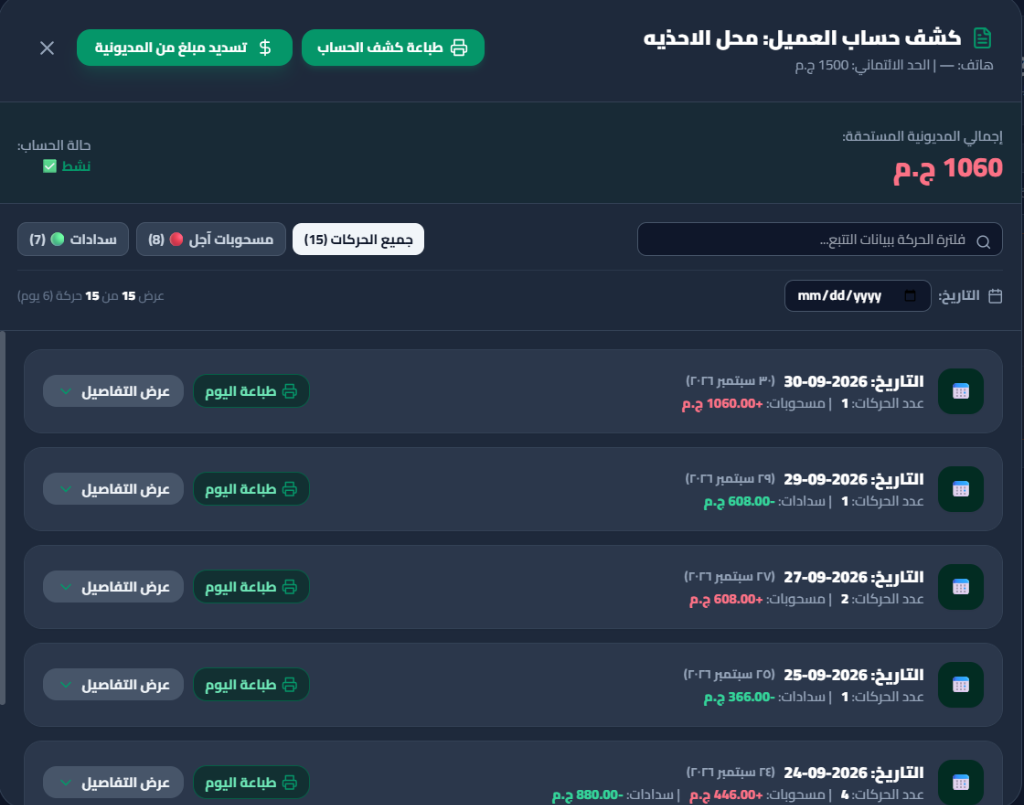
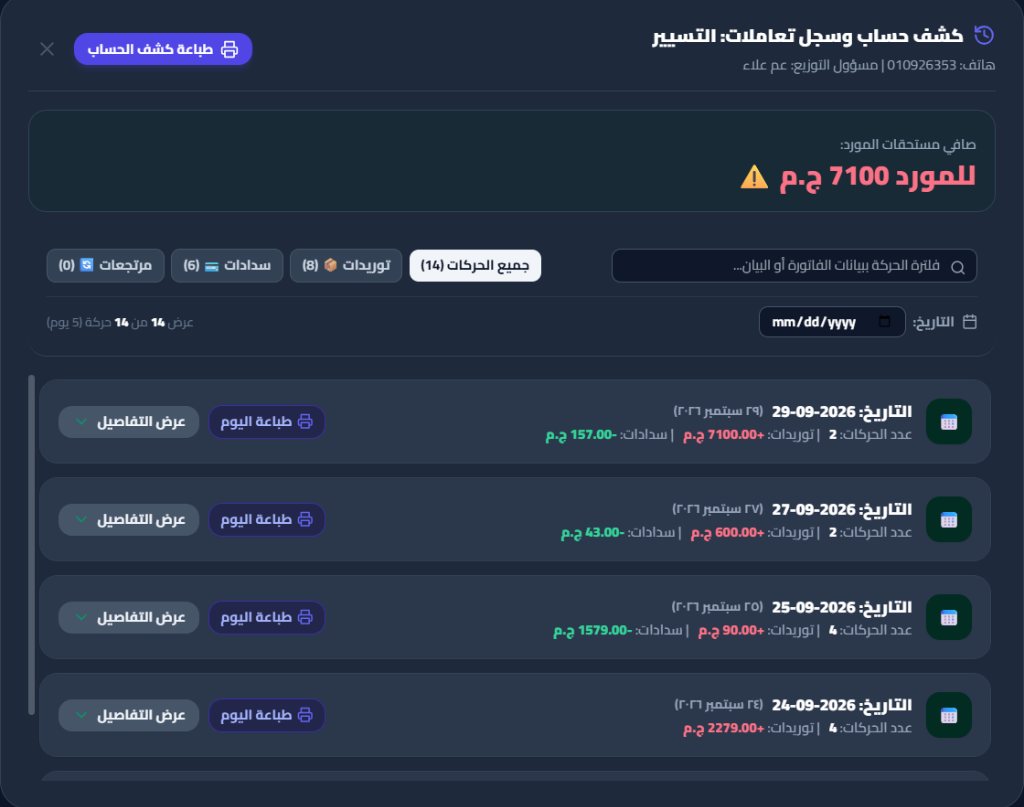
From customer credit accounts to supplier balances, ZAAD records every invoice, payment, and return in a clear ledger with exact timestamps and balances.
Money with a customer? Their full statement is right in front of you.
Credit sales, collections, returns, and a daily transaction ledger.
Owe money to a supplier? Never lost in a sea of invoices.
Shipments, payments, returns, and outstanding balance in a single statement.
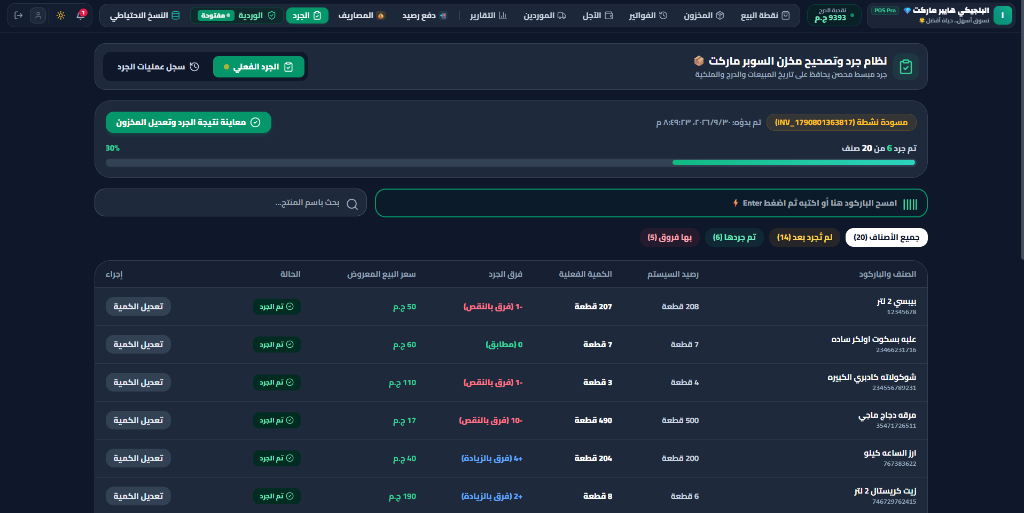
Count your inventory... without starting from scratch every time.
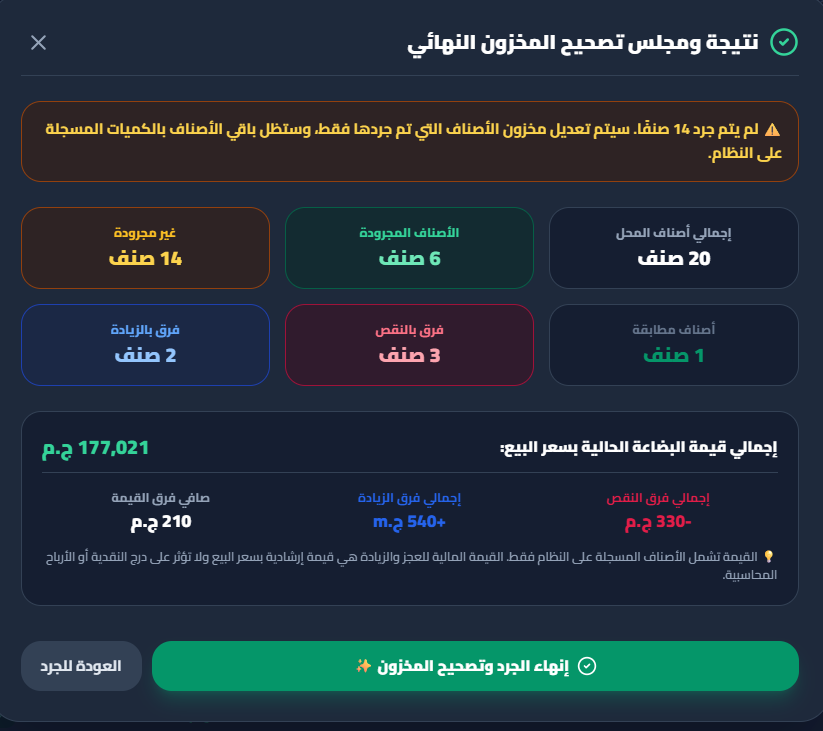
Start a count session and scan barcodes or search by name. ZAAD instantly compares physical quantities against system stock, revealing matching items, shortages, and surpluses before committing stock adjustments.
Paused your count? Pick up right where you left off.
Draft stock counts are saved locally and can be resumed even after restarting the application.
Performing a partial count? Uncounted stock remains untouched.
When committing the audit, only counted items are updated—all uncounted catalog items stay completely untouched.
Receive by the carton... and let ZAAD calculate the pieces.
Select how the item is received and the number of pieces per package, then enter the number of packages purchased. ZAAD automatically converts it into the actual piece quantity entering inventory.
And the supplier invoice? Split payment exactly as it actually happened.
Record purchase invoice payments across multiple supported payment channels when needed, so recorded transactions match actual funds paid.
Years of store data never lost to a hardware failure.
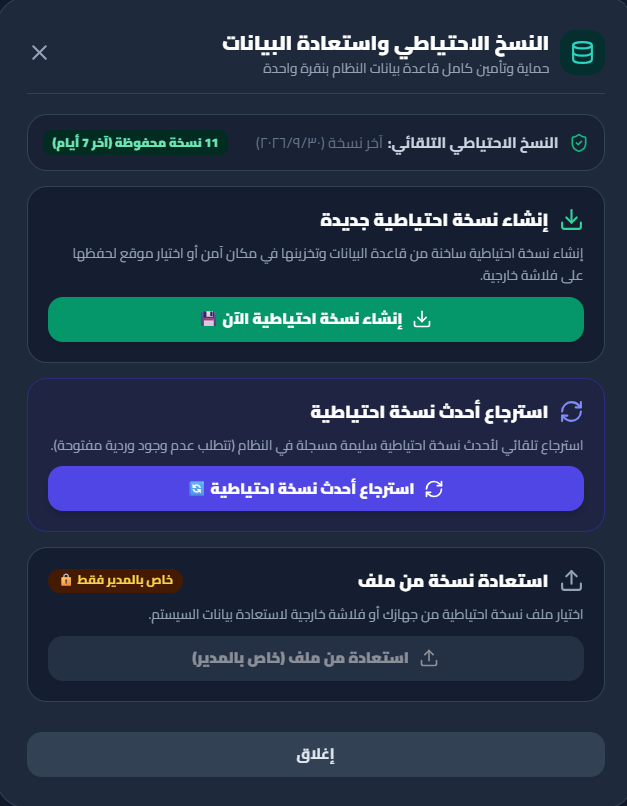
ZAAD POS protects your store data with automated background backups, plus one-click manual snapshots and quick restoration whenever needed.
All the Tools Your Store Needs
From Point of Sale to reports and local backups — all core operational tools in one system.
Point of Sale (POS)
Fast checkout & thermal receipts
Inventory Control
Real-time stock deduction
Purchases & Receiving
Package conversion & invoices
Customer Accounts
Credit debt & payment ledgers
Supplier Accounts
Shipments & balance tracking
Returns & Refunds
Item return audit register
Operational Expenses
Store expense logging
Guided Stocktaking
Stock variance calculation
Shift Control
Cashier float & drawer audit
Daily Z Reports
Automated day-end summary
Local Backups
One-click snapshot restore
Staff Permissions
Role-based action control
Your Store Data Stays Under Your Control.
Core operational store data is safely stored locally on your device.
100% Local Execution
No cloud database subscription or external server hosting required.
No Internet Dependency
Core daily operations require no cloud database subscription or continuous internet connection.
Local Operational Ledger
All critical store data—sales, inventory, customers, supplier accounts—is stored locally on the retail store's computer in a high-performance SQLite database.
Optional Gmail Integration
ZAAD POS utilizes the gmail.send scope strictly to dispatch automated Daily Z reports when enabled, and never accesses or reads inbox contents.
- ✓ Scope requested: https://www.googleapis.com/auth/gmail.send
- ✓ Credentials stored securely on local desktop disk
- ✓ Revocable anytime via Google Account settings
Built to Simplify Daily Store Operations
See ZAAD POS Working for Your Store Firsthand
Schedule a live demonstration and see sales, inventory, shifts, and reports in action.
ابدأ تجربة نظام زاد في متجرك
املأ بيانات نشاطك وسنتواصل معك فوراً لتجهيز نسختك التجريبية وتدريبك عليها.